David Gessel
A few C19 Predictions (from 2020-05-05)
UPDATE: Sept 2022
The introduction of the first successful vaccine was much faster than I anticipated, the first shots going into arms Dec 14, 2020, just 7 months after I wrote this – a lot shorter than the 18 months generally predicted in early 2020. This was due to the emergency use authorization given to the mRNA vaccines which were already much further along than I was aware based on a decade’s research on SARS. That was great and unexpected news. Otherwise things have generally played out as predicted from relatively short immunity (we should all be getting our 5th shot around now) and almost certainly contributing to the global instability we’re experiencing globally.
The most reasonable way to plan for the future is to project from the past. Anything else is magical thinking.
There’s no vaccine, there’s no rational reason to believe one will be generally available in <18 months even if any of the current candidates works perfectly, there’s plenty of reasons to believe there will not be one in our lifetimes, by far the most likely outcome based on the lack of success of all vaccine efforts to date for corona family viruses, which have included many promising candidates that made it into human trials only to prove ineffectual. Sure, maybe we get lucky, but so too we might all win the lottery. The history of corona virus vaccine development projects forward to no vaccine for a long, long time if ever. Anyone confidently saying “when a vaccine is available” rather than “if a vaccine is available” is thinking magically. “When we figure out warp drive, we can visit the stars!” Further, if immunity isn’t long lasting, so too will vaccines be short-lived, not that getting a shot every 3 years or even every 3 months isn’t vastly better than getting sick with a potentially fatal disease that often. It is, and even a short-lived vaccine will at least make life much easier for those with access to it.
| Immunity/Vaccine | No Vaccine | Vaccine works |
| Short Immunity | Average human lifespan drops substantially, wealthy countries benefit from pharmaceutical interventions, travel never recovers. | Wealthy populations live normally but with regular boosters, poor die young(er) |
| Long Immunity | Poor/uncontrolled populations have economic advantage due to rapid herd immunity. | Starting 18 months after successful P3 trials, 1-2 years to wealthy country immunity. In 40-50 years C19 may be completely eradicated. |
This means that, while the possibility of a vaccine as a path to immunity without getting sick is possible, it isn’t probable. It is not rational to isolate with the expectation of escaping a C19 infection, rather isolation delays the (probably) inevitable infection almost everyone is going to get, isolation should be considered a purely temporary strategic pause that is squandered if not used to best advantage.
There’s no novel or specific pharmaceutical intervention, though some medications show promise of mitigating mortality. It does appear that good old-fashioned high-quality medical care in not overwhelmed facilities achieves an amazing reduction in CFR – from 12-14% all the way down to about 0.6% and possibly even lower. Sure, that’s probably at least a big chunk of sampling bias, but not all and that’s pretty awesome. It is normal that treatment improves with sufficient attention and resources and also quite reasonable to expect that some combination of medications will help mitigate the impact of the disease, perhaps systemically (for everyone who gets it), but almost certainly for mitigating certain problematic conditions. Some improvement is inevitable given the wide range of outcomes as good data accumulates: there are reasons why there is so much difference in outcome, we will figure some of those out. Science: it takes time, but it is happening.
This means is that delaying getting sick by quarantine or other measures has two values – first and most importantly it reduces the risk of overloading regional medical response capabilities which seems to, and reasonably would, correlate with much better patient outcomes. It also means it isn’t absurd to delay as long as possible getting sick if you fall into one of the categories currently indicated as being particularly at risk for a bad outcome as it isn’t unreasonable to believe the protocols for achieving a successful outcome will improve in time, even absent a miracle drug.
All solutions are hyped, none are promising: by now people have to be getting jaded reading breathless headlines or absurdly emphatic pre-pub papers about this team or that discovering some cure or being on the verge of a vaccine. Every researcher is working late hoping to be the hero that saves humanity, and we’re all desperate to find that hero, but so far, there’s no easy solution. We’re all inclined to fall into a confirmation bias trap finding some iconoclastic researcher claiming promising results from a process that confirms one’s own pet theory: that should always be a red flag. This is a long slog: years, perhaps many.
Humanity has to prepared to live with this from now on, even while hoping for a vaccine or cure. It isn’t something we can hide inside from until it gets bored and goes away. It isn’t some planet-to-planet salesman who’s going to give up if we don’t come to the door and move on. As a species, we have to find some enduring accommodation to a disease that is highly contagious, is transmissible in individuals with no symptoms, and has a problematically high mortality rate. We are not sure yet whether we will develop lasting immunity and push it into containable corners of the population eventually or not, but even the least controlled areas will take many months if not years to develop R<1.0 herd immunity necessary to ensure a single infectious person doesn’t trigger an exponentiation surge in the sick and dying, and they will do so at high cost. The regions that practice the most effective interventions delay achieving herd immunity, possibly indefinitely if immunity isn’t long lasting.
Universal quarantine is not sustainable: stay at home orders are intrinsically temporary, whether the people issuing them understand this or not. How long they will last depends on submission level of the population, “herd economics” – that is the economic capacity of a sufficient majority to maintain law and order, and the interventions of the government or community to mitigate the consequences. “Economic” consequences are just an abstraction of hunger, homelessness, access to medical care, funeral services, heat, air conditioning, light, and refrigeration; the poorest regions are falling first to the economic (and medical) consequences of quarantine: in Kenya more people have been executed for violating quarantine than have died of C19. There are riots in India and Lebanon, massive protests in the US. This can not last, it is an emergency temporary hold to buy time to design and implement a sustainable mitigation or it is an astonishingly tragic waste of the limited resources humanity had in the face of a calamity that will merely delay the inevitable and result in a far, far worse systemic outcome than doing nothing would have. If quarantine collapses without a clear plan, it does so at the exhaustion of capital resources, both individual and governmental, and drops a globally impoverished world, still lacking sufficient immunity, into a now globally distributed pandemic that we still have almost no resistance to and have far less resources to fight.
Lifting quarantine just because the “curve has flattened” is extremely dangerous. All universal quarantine does is brute-force stop transmission. It doesn’t magically make people more immune. It doesn’t magically make the disease vanish from the planet. Universal quarantine obviously will be effective in stopping transmission, which will, obviously, lower infection rates and death rates, and just as obviously ending quarantine will simply dump a still susceptible population into a, once again, high transmission environment and, of course, case rates and death rates will rise. Quarantine can be safely relaxed when other effective mitigation strategies are in place and working. Optimally, a staged series of incremental relaxations, each expected to raise transmission rates by some manageable amount offsetting a reduction achieved by a more economically viable intervention should be phased in while monitoring the results. Any step that pushes transmission rates beyond what can be managed should be rescinded until additional effective mitigation protocols are in place.
It isn’t hopeless – management is possible, even absent a miracle like UVC suppositories or bleach injections. One might think of the problem this way:
A) You have some density of infectious people,
B) You have some density of susceptible people,
C) You have some rate of transmission between the infectious and the susceptible,
D) you have some rate of death due to the infection.
The combination of A, B, and C is the Rate of Transmission, R₀. As long as this is above 1.0, the infection grows. There’s some level of “D” that we’re willing to tolerate where R₀ doesn’t matter. In most countries, D seems to increase with R, from a nearly tolerable level to a level that we’re not willing to tolerate. Therefore the goal is simply to intervene to control R₀ so that D is as acceptable as it can reasonably be. Not so tricky. But we have to keep in mind that some solutions are sustainable and tolerable and some are not. We could just execute everyone with a fever. We could just lock everyone into their homes and execute anyone who steps outside. We could also just burn down the homes of any infected person with the family inside (a la Milan c 1350). While any of these would be quite effective and, if instituted globally would eradicate the virus; some solutions might not be acceptable in all regions.
We know for sure now that universal quarantine, even without martial law, does control R₀ quite well by only managing C, but only for so long before it falls apart and becomes unacceptable. We also know for sure now that even one infectious person (A) interacting with an unprotected population (B), under “normal” interaction conditions (C) results in catastrophic values for D. It is not rational to believe A will ever be zero.
So we need to find something other than universal quarantine, something that is sustainable that reduces A, B, and/or C such that R₀ is low enough that D is acceptable. B will decline naturally as the percentage of the surviving population is “recovered,” and will do so fastest in those regions with the highest rates of infection, therefore, the level of control, C, necessary to keep D in check will decrease over time even without an advances in treatment. Further, there isn’t only one solution to C: there are many ways to achieve lower transmission rates; we need to find those that match regional infection rates to regional medical capacity at the lowest economic cost.
While there may be a perfect solution to any one of ABCD someday, that’s highly unlikely. But it isn’t needed if there are sufficient yet acceptable partial solutions to all that work together to get D where we can live with it:
A) Accessible testing, contact tracing, wide-area temperature screening, serum testing, etc. all help to reduce A, the density of the infectious. None of these have to be perfect, all any has to do is selectively preferentially identify the infected out of the uninfected and include a mechanism for isolating them and it helps reduce A, the effective density of the infectious—it might not be a “solution” in and of itself, but it doesn’t have to be. Detection only works if there’s a tolerable mechanism for isolating the infected from the interaction pool but this really shouldn’t be hard or economically untenable given we isolated everyone and most people have neither starved nor died unnecessary at home from conditions normally treatable. The better targeted and the more constrained (in breadth and time) the isolation, the lower the economic impact, but of course at a cost. Balancing the cost of isolation interventions with efficacy is dynamic..
B) Identification of those particularly likely to suffer adverse outcomes and isolating them specifically rather than everyone should, it seems from data so far, be a possible way to reduce D substantially in a selective and therefore more sustainable way. This means gathering more data on co-morbidity, screening, and providing targeted isolation and support for those at risk. As above: everyone is isolated now and it hasn’t collapsed the world yet; selective isolation of the susceptible is less effective but more sustainable. Most importantly, the more people who get sick and recover the lower the ratio of susceptible people will be; this is the only reliable end game. As time goes on, it is reasonable to believe the ratio of recovered will rise and become the most significant “intervention” in reducing transmission.
C) So far as I’ve seen (and WHO reports) the only mode of statistically meaningful transmission is droplets and direct contact, neither airborne nor delayed contact shows up in transmission analysis. While there may be indirect transmission by fomites or airborne transmission occasionally, the rate is so low as to be lost in the noise of the data available. This suggests that relatively sustainable mechanisms will be able to effectively mitigate C, such as universal outgoing breath filtering masks on the potentially infected population (meaning simple masks that capture droplet spray for just about everybody for now), input filtering masks on the most vulnerable susceptible population (meaning N95 grade masks to block ingestion of viral particles), wide spread hand washing and sterilization protocols, and other interventions as transmission routes are validated.
D) In time, research on infection rates will improve understanding of disease progression and validate effective interventions to mitigate it. The better this works, the lower the cost of allowing people to get sick and the more rapidly we can allow people to transition from susceptible to recovered.
It will take some carefully controlled epidemiological work and a lot of involuntary human experimentation to find a combination of factors that simultaneously optimize C19 mortality rates and economic viability, but that is just science and does not rely on any miracles. It will, for sure, be less than full lock down. It will not, for sure, be “back to normal”—at least not until 70% or so of the population has recovered—and that’s assuming at least long-term immunity, which may not happen. If long-term immunity isn’t conferred by recovery, a balanced combination of interventions is sustainable indefinitely, though obviously not ideal.
Lock down is already ending intentionally and catastrophically. In the US this is without any rational follow on plan, just “oh well, lets see what happens.” This is not a mystery… recovered rates are about 1-4% or so by now, which is utterly insufficient for herd immunity to meaningful reduce “B” and justify ending meaningful control of “C.” Places that “go back to normal” will be disasters in 3-5 weeks. That will, alas, set back more rational plans to relax universal quarantine, which are needed and must happen to minimize the consequences of an economic catastrophe. Germany is, intelligently, focusing on Re and health care load. They got Re to 0.7, started relaxing, and now it is back up to 1.0. At Re 1.1, Merkel estimates health care fails in Oct and at Re 1.3 in June. A rise in Re with the relaxation of isolating interventions is expected—the research we need is to provide an understanding of which interventions have the highest benefit:cost ratio.
Perhaps by late summer or early fall people will start realizing this is a long term problem and we have to find a way to live with it and various sustainable mitigation combinations might be tried and those that are successful understood and those that are not abandoned. Until then, the world is fumbling blindly.
I suspect that within a year there will be a “new normal” that permits some travel (at least with carte jaune for the recovered) and fairly normal commerce. I expect unemployment rates to peak around 40%, widespread global food insecurity, weaker governments will topple and there will be regional wars intensifying, which is already happening, and new wars emerging. Intrinsically social businesses will remain or return to being outlawed in those areas were law still holds force (I am pretty confident the entire US will be relatively stable as will most developed countries). This means no (sit down) restaurants, bars, clubs, movies, etc. Population mortality rates in stable areas will be around 1% of total population but in regions without sufficient stability it will be 10%+. Regions that “fail” will be problematic sources of unrest, terrorism, and reservoirs of disease for many, many years to come as even the recent marginally effectual international interventions will be far less economically viable for the countries that have historically provided aid.
Herd immunity will become meaningful in about a year in unstable regions with about 5%-10% loss of total population. In stable regions, herd immunity might reach 30-40% in this time, sufficient for meaningful improvements in social constraints. Unemployment will begin to decline after it peaks in about year, though there will be intermediate rises as falls as intervention mechanisms are tested and some fail; I anticipate in this time stable regions will move into optimistic territory and start rebuilding, though it will be a long process.
I’d think that within 3-5 years there will be sufficient global herd immunity that in combination with mass screening protocols that will be “normal” by then and with protective protocols for the most vulnerable, most people will interact socially and economically more or less as we remember we used to. I doubt total population reduction will be much more than 2-5%, mostly driven by the poor who were made homeless/resource-less due to economic dislocation; the wealthy will get through with 0.5-1.0% total loss. I’d think by this time we’d have a post-plague restructuring of the economy mostly complete. Flattening curves are very encouraging in most of the world, but those areas are locked down with universal quarantine; flattening curves are what should happen under such restrictions, but no underlying conditions have changed from when infection rates were rocketing up exponentially other than lockdown itself so if lockdown ends infection rates will also rebound.
The US may have to default though that depends on global outcomes. I am dubious of the US’s ability to weather this well. While economics isn’t a zero sum game, neither is it unbounded. It is largely relative and the US is incurring massive debt under the assumption that it will be manageable because of the US’s historical economic position. This depends on a market for US debt which depends on US economic capability relative to the rest of the world. Asia was gaining fast on US economic hegemony and there has been ongoing pressure, exacerbated by the unpopular actions of the administration, to find an alternative to the USD as the reserve currency. If this happens, US debt could collapse quite suddenly as the cost of equity-securitized debt creates a potentially catastrophic negative feedback loop that can unpredictably result in runaway inflation. On the other hand, everyone hates China right now and come November the US might have less problematic leadership. Should the US be the source of vaccine or effective medical intervention, the US could emerge as we did from WWII: as the provider of economic and military expertise to the successful regions of the world, even if this seems optimistic at the moment.
Save your email! Avoid the Thunderbird 68 update
UPDATE: 78 just repeated history with another unwelcome surprise update.
I’ve come to some peace with 68 as most of the really critical plugins were updated. But 78 is a long way from there and TB devs have continued to create some really bad blood with add-on developers. I’d argue that the strategy being taken by the devs toward compatibility is defensible, but they seem deaf to the empty wasteland they’ve made of the add-on marketplace. For me, one of the critical deficiencies is losing the support of the Enigmail developers (curiously, this 2019 post seems to be a bit behind release 2.2.4.1, which apparently adds support (!).)
A key issue is that many add-ons require hooks into the base code to be able to do things like add menus or interact with users and most of these were terminated. There is a mechanism by which tentative experimental access to many (but not all) of the previously available hooks can still be connected, but taking advantage of that experimental access still imposes a burden of rewriting, refactoring, and retesting – and then recovering user trust. All for a provisional access status that the TB devs helpful advise developers they should beg and plead to make core lest it be capriciously disabled at any future update. Understandably, those devs who stuck with TB through several major revisions of the add-on architecture and suffered reputational and time cost because of them, perceive this “convince us you’re worthy and we may grant a permanent reprieve to your code should we consider it not utterly beneath our notice” attitude as off putting.
(This is now a bit obsolete, referencing the last screw-ya’ll update that was pushed out without notice or option, it is clearly too much to hope that TB devs stop being so sure that “if you don’t do email our way, you’re doing it wrong.”)
TL:DR
If you’ve customized TB with plugins you care about, DO NOT UPDATE to 68 until you verify that every plugin you use is compatible. TB will NOT check for you and once you launch 68, the plugins that have been updated to 68 compatibility will not work with 60.x, which means you better have a backup of your .thunderbird profile folder or you’re going to be filled with seething rage and you’ll have to undo the update. This misery is the consequence of Mozilla having failed to fully uphold their obligation to the user and developer communities that rely on and have enhanced the tools they control.
BTW: if you’re using Firefox and miss the plugins that made it more than just a crappy clone of Chrome, Waterfox is great and actually respects users and community developers. Give it a try.
Avoid Thunderbird 68 Hell
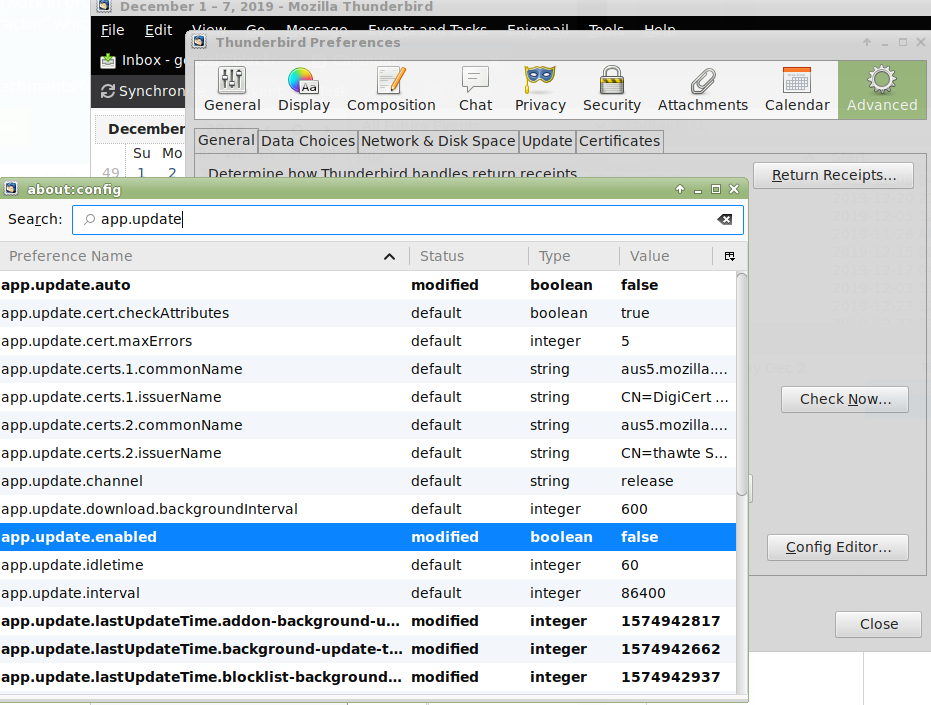
To avoid this problem now and in the future, you have to disable automatic updates. In Thunderbird: Edit->Preferences->Advanced->General-[Config Editor…]->app.update.auto=False, app.update.enabled=False.
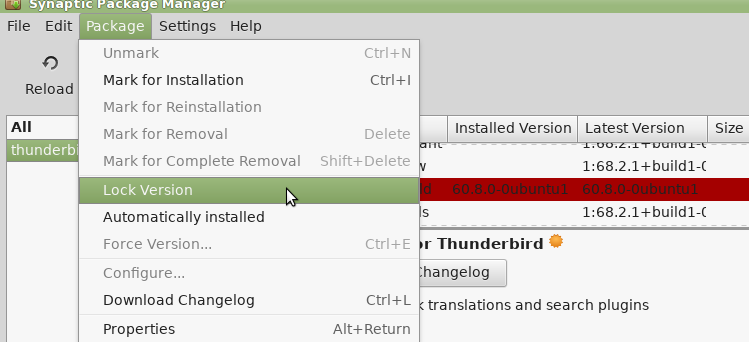
On Linux, you should also disable OS Updates using Synaptic: select installed thunderbird 60.x and then from the menu bar Package->Lock Version.
If you’ve been surprise updated to the catastrophically incompatible developer vanity project and massive middle finger to the plugin developer community which is 68 (and 60 to a lesser extent), then you have to revert. This sucks as 60.x isn’t in the repos.
Undo Thunderbird 68 Hell
First, do not run 68. Ever. Don’t. It will cause absolute chaos with your plugins. First it showed most incompatible, then updated some, then showed others compatible, but had deleted the .xpi files so they weren’t in the .thunderbird folder any more, despite being listed and shown incorrectly as compatible. This broke some things I could live without like Extra Format Buttons, but others I really needed like Dorando Keyconfig and Sieve. Mozilla’s attitude appears to be “if you’re using software differently than we think you should, you’re doing it wrong.”
The first step before breaking things even more is to backup your .thunderbird directory. You can find the location from Help->Troubleshooting Information->Application Basics->Profile Directory. Just click [Open Directory]. Make a backup copy of this directory before doing anything else if you don’t already have one, in linux a command might be:
tar -jcvf thunderbird_profile_backup.tar.bz2 .thunderbird
If you’re running Windows, old installers of TB are available here.
In Linux, using a terminal, see what versions are available in your distro:
apt-cache show thunderbird
I see only 1:68.2.1+build1-0ubuntu0.18.04.1 and 1:52.7.0+build1-0ubuntu1. Oh well, neither is what I want. While in the terminal uninstall Thunderbird 68
sudo apt-get remove thunderbird
As my distro, Mint 19.2, only has 68.x and 52.x in the apt cache, I searched to find a .deb file of a recent version. I couldn’t find the last plugin compatible version, 60.9.0 as an easy to install .deb (though it is available for manual install from Ubuntu) so I am running 60.8.0, which works. One could download the executable file of 60.9.1 .and put it somewhere (/opt, say) and then update start scripts to execute that location.
I found the .deb file of 60.8.0 at this helpful historical repository of Mozilla installers. Generally the GUI will auto-install on execution of the download. But don’t launch it until you restore your pre-68 .thunderbird profile directory or it will autocreate profile files that are a huge annoyance. If you don’t have a pre-68 profile, you will probably have to hunt down pre-68 compatible versions of all of your plugins, though I didn’t note any catastrophic profile incompatibilities (YMMV).
Good luck. Mozilla just stole a day of your life.
Frequency of occurrence analysis in LibreOffice
One fairly common analytic technique is finding out, for example, the rate at which something appears in a time referenced file, for example a log file.
Lets say you’re looking for the rate of some reported failure to determine, say, whether a modification or update had made it better or worse. There are log analysis tools to do this (like Splunk), but one way to do it is with a spreadsheet.
Assuming you have a table with time in a column (say A) and some event text in another (say B) like:
11-19 16:51:03 a bad error happened
11-19 16:51:01 something minor happened
11-19 12:51:01 cat ran by
you might convert that event text to a numerical value (into, say, column C) for example by:
=IF(ISERROR(FIND("error",B1)),"",1)
FIND returns true if the text (“error”) is found, but returns an error if not. ISERROR inverts that and returns logical values for both. The IF ISERROR construction allows one to specify values if the text is found or not – a bit complex but the result in this case will be “” (blank) if “error” isn’t found in B1 and 1 if “error” is found.
Great, fill down and you have a new column C with blank or 1 depending if “error” was found in column B. Summing column C yields the total number of lines in which the substring “error” occurred.
But now we might want to make a histogram with a sum count of the occurrences within a specific time period, say “errors/hour”.
Create a new column, say column D, and fill the first two rows with date/time values separated by the sampling period (say an hour), for example:
11/19/2019 17:00:00
11/19/2019 16:00:00
And fill down; there’s a quirk where LibreOffice occasionally loses one second, which looks bad. It probably won’t meaningfully change the results, but just edit the first error, then continue filling down.
To sum within the sample period use COUNTIFS in (say) column E to count the occurrences in entire columns that meet a string of criterion: in this case three criterion have to be met: the value of C is 1 (not “”), The value of A (time) is before the start of the sampling period (D1) and after the end (D2). That is:
=COUNTIFS(C1:C500,"1",$A1:$A500,">="&$D2,$A1:$A500,"<"&$D1)
Filling this formula down populates the sampling periods with the count per sampling period, effectively the occurrence rate per period, in our example errors/hour.
Lets encrypt with security/dehydrated (acme-client is dead)
Well…. security/acme-client is dead. That’s sad.
Long live dehydrated, which uses the same basic authentication method and is pretty much a drop in replacement (unlike scripts which use DNS authentication, say).
In figuring out the transition, I relied on the following guides:
- https://ogris.de/howtos/freebsd-dehydrated.html
- https://wiki.freebsd.org/BernardSpil/LetsEncrypt.sh
- https://erdgeist.org/posts/2017/just-add-water.html
If you’re migrating from acme-client, you can delete it (if you haven’t already)
portmaster -e acme-client
And on to installation. This guide is for libressl/apache24/bash/dehydrated. It assumes you’ve been using acme-client and set it up more or less like this.
Installation of what’s needed
if you don’t have bash installed, you will. You can also build with ZSH but set the config before installing.
cd /usr/ports/security/dehydrated && make install clean && rehash
or
portmaster security/dehydrated
This guide also uses sudo, if it isn’t installed:
cd /usr/ports/security/sudo && make install clean && rehash
or
portmaster /security/sudo
Set up directories and accounts
mkdir -p /var/dehydrated
pw groupadd -n _letsencrypt -g 443
pw useradd -n _letsencrypt -u 443 -g 443 -d /var/dehydrated -w no -s /nonexistent
chown -R _letsencrypt /var/dehydrated
If migrating from acme-client this should be done but:
mkdir -p -m 775 /usr/local/www/.well-known/acme-challenge
chgrp _letsencrypt /usr/local/www/.well-known/acme-challenge
# If migrating from acme-client
chmod 775 /usr/local/www/.well-known/acme-challenge
chown -R _letsencrypt /usr/local/www/.well-known
Configure Dehydrated
ee /usr/local/etc/dehydrated/config
add/adjust
014 DEHYDRATED_USER=_letsencrypt

017 DEHYDRATED_GROUP=_letsencrypt

044 BASEDIR=/var/dehydrated

056 WELLKNOWN="/usr/local/www/.well-known/acme-challenge"

065 OPENSSL="/usr/local/bin/openssl"

098 CONTACT_EMAIL=gessel@blackrosetech.com
save and it should run:
su -m _letsencrypt -c 'dehydrated -v'
You should get roughly the following output:
# INFO: Using main config file /usr/local/etc/dehydrated/config
Dehydrated by Lukas Schauer
https://dehydrated.io

Dehydrated version: 0.6.2
GIT-Revision: unknown

OS: FreeBSD 11.2-RELEASE-p6
Used software:
bash: 5.0.7(0)-release
curl: curl 7.65.1
awk, sed, mktemp: FreeBSD base system versions
grep: grep (GNU grep) 2.5.1-FreeBSD
diff: diff (GNU diffutils) 2.8.7
openssl: LibreSSL 2.9.2
File adjustments and scripts
by default it will read /var/dehydrated/domains.txt for the list of domains to renew
Migrating from acme-client? Reuse your domains.txt, the format is the same.
mv /usr/local/etc/acme/domains.txt /var/dehydrated/domains.txt
Create the deploy script:
ee /usr/local/etc/dehydrated/deploy.sh
The following seems to be sufficient
#!/bin/sh

/usr/local/sbin/apachectl graceful
and make executable
chmod +x /usr/local/etc/dehydrated/deploy.sh
Give the script a try:
/usr/local/etc/dehydrated/deploy.sh
This will test your apache config and that the script is properly set up.
There’s a bit of a pain in the butt in as much as the directory structure for the certs changed. My previous guide would put certs at /usr/local/etc/ssl/acme/domain.com/cert.pem, this puts them at /var/dehydrated/certs/domain.com
Check the format of your certificate references and use/adjust as needed. This worked for me – note you can set your key locations to be the same in the config file, but the private key directory structure does change between acme-client and dehydrated.
sed -i '' "s|/usr/local/etc/ssl/acme/|/var/dehydrated/certs/|" /usr/local/etc/apache24/extra/httpd-vhosts.conf
Or if using httpd-ssl.conf
sed -i '' "s|/usr/local/etc/ssl/acme/|/var/dehydrated/certs/|" /usr/local/etc/apache24/extra/httpd-ssl.conf
And privkey moves from /usr/local/etc/ssl/acme/private/domain.com/privkey.pem to /var/dehydrated/certs/domain.com/privkey.pem so….
sed -i '' "s|/var/dehydrated/certs/private/|/var/dehydrated/certs/|" /usr/local/etc/apache24/extra/httpd-vhosts.conf
# or
sed -i '' "s|/var/dehydrated/certs/private/|/var/dehydrated/certs/|" /usr/local/etc/apache24/extra/httpd-ssl.conf
Git sum certs
su -m _letsencrypt -c 'dehydrated --register --accept-terms'
Then get some certs
su -m _letsencrypt -c 'dehydrated -c'
-c is “chron” mode which is how it will be called by periodic.
and “deploy”
/usr/local/etc/dehydrated/deploy.sh
If you get any errors here, track them down.
Verify your new certs are working
cd /var/dehydrated/certs/domain.com/
openssl x509 -noout -in fullchain.pem -fingerprint -sha256
Load the page in the browser of your choice and view the certificate, which should show the SHA 256 fingerprint matching what you got above. YAY.
Automate Updates
ee /etc/periodic.conf
insert the following
weekly_dehydrated_enable="YES"
weekly_dehydrated_user="_letsencrypt"
weekly_dehydrated_deployscript="/usr/local/etc/dehydrated/deploy.sh"
weekly_dehydrated_flags="-g"
note the flag is –keep-going (-g) Keep going after encountering an error while creating/renewing multiple certificates in cron mode
Update Waterfox with the new PPA on Mint 19.1
The Waterfox PPA changed recently. The following let me update from 56.2.8 to 56.2.10 (between which the old PPA was removed).
First remove the old hawkeye PPA from your sources list, then:
echo "deb http://download.opensuse.org/repositories/home:/hawkeye116477:/waterfox/xUbuntu_18.04/ /" | sudo tee -a /etc/apt/sources.list
wget -nv https://download.opensuse.org/repositories/home:/hawkeye116477:/waterfox/xUbuntu_18.04/Release.key -O Release.key
sudo apt-key add - < Release.key
sudo apt update
sudo apt upgrade
Note Ubuntu 18.04 = Mint 19/19.1 the 18.10 deb fails.
1976 GMC Suburban
When I was a young child, my dad bought a brand new 1976 GMC Suburban. Yellow. No extras at all – no head liner, plastic seats, manual everything, 305 V8.
It became my car in high school, survived that. Came out to California with me; ended up in the service of SRL, survived that too.
Eventually, it escaped.

Ruby config options fail
Ruby is a horrible nightmare language, like almost all modern languages. They try to be so clever and modular, but end up making a maintenance hassle as various modules come and go, dependencies break, and the developer community moves on to the next shiny thing that claims to be the best thing to happen to programming since C.
Oh well.
If you get a bunch of "invalid option: --no-rdoc" errors, it is because sometime in the last few years --no-rdoc and --no-ri were depreciated in favor of --no-document. And, apparently, just recently builds started barfing on the deprecated errors. Building universally with these options is a pretty standard thing as it vastly improves build time and the rdoc system is a whole big kettle of annoying weirdness you just don’t need to wade through.
Now Ruby, being oh-so-clever and friendly, has all sorts of places where these might be set universally or semi-universally. The references will tell you about /.gemrc and /etc/gemrc, but only by doing a grep -FrHIis 'no-rdoc' * at / did I find these sneaky little bastards:
basejail/usr/ports/sysutils/vagrant/Makefile:RUBYGEM_ARGS=      --no-ri --no-rdoc -l --no-update-sources \

basejail/usr/ports/Mk/Uses/gem.mk:RUBYGEM_ARGS+=        --no-rdoc --no-ri

basejail/usr/ports/devel/ruby-gems/Makefile:DOCS_VARS_OFF=      RUBY_SETUP_OPTIONS+="--no-ri --no-rdoc"

basejail/usr/ports/devel/rubygem-io-like/Makefile:DOCS_VARS_OFF=                RUBYGEM_ARGS+=--no-rdoc
After converting those to the “new” “better” “shiny” version of the config option string did my gems build.
Getting the postfixadmin 3.2 update to work with FreeBSD
Postfixadmin is a very nice tool for managing a mail server via a nice web interface that just went through an update to add some security and compatibility features, but at the current revision there are a few bugs (the maintainer says these will all be cleared up in the next release). A few work-arounds:
If you get:
pkg-static: Unable to access file /var/ports/usr/ports/mail/postfixadmin/work/stage/usr/local/share/postfixadmin/README.md:No such file or directory
Then run
# make config
and enable DOCS.
If you get
PHP Fatal error: Uncaught exception 'PharException' with message 'phar "/usr/local/www/postfixadmin/lib/random_compat.phar" openssl signature could not be verified: openssl not loaded' in /usr/local/www/postfixadmin/lib/random_compat.phar:8\nStack trace:\n#0 /usr/local/www/postfixadmin/lib/random_compat.phar(8): Phar::webPhar(NULL, 'index.php')\n#1 /usr/local/www/postfixadmin/common.php(72): require_once('/usr/local/www/...')\n#2 /usr/local/www/postfixadmin/public/common.php(2): require_once('/usr/local/www/...')\n#3 /usr/local/www/postfixadmin/public/setup.php(27): require_once('/usr/local/www/...')\n#4 {main}\n thrown in /usr/local/www/postfixadmin/lib/random_compat.phar on line 8
There’s a dependency that’s not built into the makefile yet.
Run
# portmaster security/php56-openssl
(adjust the PHP version to match, or the install command to suit your environment). Remember to run # apachectl restart.
Also note that the directory the code is served from has been moved to the subdirectory /public for security. This may require updating URLs, DocumentRoot, or modrewrite as appropriate to the webserver environment to get to the login page.
After updating, navigate to public/upgrade.php to update the database automatically.
And because this is open source and not some horrible closed source product, it took a whole 2 hours for a fix.
https://bugs.freebsd.org/bugzilla/show_bug.cgi?id=231424
Thanks ports.maintainer@evilphi.com!
How to stick with a decent version of Firefox (pre-Quantum)
Firefox (52) remains my browser of choice – entirely because of plug-ins. When Firefox completely destroyed the UI/UX with “Australis,” a horrific UI change that basically made Firefox into a crappy clone of Chrome, the only thing that made Firefox usable was “Classic Theme Restorer.” Apparently, unsatisfied with the damage Mozilla had managed to wreak on their user-base with idiotic UI decisions, over the past year or so, a new version called “Quantum” (57) was rolled out that broke the functionality of almost every important plug-in.
This utterly disastrous and truly unforgivable transgression against the user-base was only slightly mitigated by sustaining 52-ESR, at least until the Sept of this year. After that, everyone who cares about having a decent alternative to Chrome will have to migrate to Waterfox.
In the mean time, one really important thing you have to remember to do if you stuck reinstalling your system on Linux (e.g. Linux Mint) is to immediately uninstall Firefox before using it even once. Then change your install version to ESR and install. If you let Quantum run even once, it will mark all your good plugins as disabled and you need to reinstall them one at a time to get them working again.
sudo add-apt-repository ppa:jonathonf/firefox-esr
sudo apt-get update
sudo apt-get install firefox-esr
Well, that’s the end of Firefox…. Sad to see it go after all these years, but the new plugin concept has made Firefox a subordinate version of Chrome rather than a powerful, customizable tool.
I followed these fine directions and now have waterfox running.
echo 'deb https://web.archive.org/web/20190207094152/https://dl.bintray.com/hawkeye116477/waterfox-deb/ release main' | sudo tee /etc/apt/sources.list.d/waterfox.list
curl https://web.archive.org/web/20200209091904/https://bintray.com/user/downloadSubjectPublicKey?username=hawkeye116477 | sudo apt-key add -
sudo apt-get update
sudo apt upgrade
sudo apt install waterfox
Just import your firefox preferences on starup and walla, you instant happiness with all the plugins that Quantum broke restored, including such absolute essentials as “Classic Theme Restorer” (which undoes the absolutely horrible UI changes that Mozilla adopted) and downthemall, privacy plugins, etc. If you’ve updated some plugins to be Quantum compatible, you’ll have to back those up (for me that’s things like FoxClocks and Noscript, which managed to hack together semi-viable Quantum compatible plugins after slogging through Mozilla’s buggy WebExtensions API and HTML5 quirks).
This whole translation is quite unfortunate. Waterfox is dependent on the Firefox code base, so this solution may have a finite lifespan, but for now it works and undoes the horror of Firefox 57+/Quantum.
Rubygem passenger flavors in FreeBSD
The latest bit of code to adopt the trendy new “flavors” model is passenger. As “flavors” aren’t supported in Portmaster, this means the transition results in errors like:
/bin/rmdir /var/ports/usr/ports/www/rubygem-passenger/work-apache/stage/usr/local/lib/ruby/gems/2.4/extensions 2> /dev/null || true
( cd /var/ports/usr/ports/www/rubygem-passenger/work-apache/passenger-5.1.12 &&  /bin/sh -c '(/usr/bin/find -Ed $1 $3 | /usr/bin/cpio -dumpl $2 >/dev/null 2>&1) &&  /usr/bin/find -Ed $1 $3 \(   -type d -exec /bin/sh -c '\''cd '\''$2'\'' && chmod 755 "$@"'\'' . {} +  -o -type f -exec /bin/sh -c '\''cd '\''$2'\'' && chmod 0644 "$@"'\'' . {} + \)' COPYTREE_SHARE buildout /var/ports/usr/ports/www/rubygem-passenger/work-apache/stage/usr/local/lib/ruby/gems/2.4/gems/passenger-5.1.12 )
find: buildout: No such file or directory
find: buildout: No such file or directory
You can make with flavors manually or (assuming your current version is 5.1.12, adjust as needed):
# portmaster -o www/rubygem-passenger rubygem-passenger-5.1.12