David Gessel
Green Lacewings
I noticed that my avocado tree was developing brown spots on the leaves, which were almost certainly the result of Persea mites.

So I looked up some possible cures, and it seemed like introducing a predator would be the best option and the least hassle. I’d had good luck with introduced ladybugs a few years back, which formed a stable population that survived for many years after introduction. For this pest, green lacewings are recommended. I found a nearby insectary that could provide larvae on cards and they shipped them overnight.

The little guys look cute just waiting to hatch…

I hung he cards on the leaves of the tree after incubating them overnight in a warm room, and they should hatch sometime in the next day or two, as long as the ants don’t find them first…
Update 8 Sept 2016:
The green lacewings seem to have eaten all the mites. It has been 9 months and there aren’t any signs of damage to this spring’s leaves. Yay!

The new leaves that grew seem to be developing without any bites at all. The old leaves that were too damaged have fallen off, but the surviving older leaves still show the scars of the mites. Green lacewings seem to have done the trick.
@UAL, Congratulations on END:VEVENT!
Life’s little victories.
Starting in 2006, when UAL.com got an upgrade, they started having problems exporting events in vcal format. They had some issues with time zone declarations that we eventually got sorted out (so many people have problems with time zones):
Ual.com now gives broken "calendar" appointments for flights.  The
times are wrong, which seems worse than no calendar function at all.

Below is a .vcf file for a flight I will be on tomorrow.
BEGIN:VCALENDAR
PERIOD:Microsoft CDO for Microsoft Exchange
VERSION:1.0
BEGIN:VEVENT
DTSTART:20061214T001000Z
DTEND:20061214T034500Z
CATEGORIES;ENCODING=QUOTED-PRINTABLE:TRAVEL
DESCRIPTION;ENCODING=QUOTED-PRINTABLE:UA 0179=0D=0ABOS to
SFO=0D=0ADepart: December 13 2006 at 18:10 PM (local time)
=0D=0AArrive: December 13 2006 at 21:45 PM (local time)
=0D=0ASeat(s): =0D=0AAPOLLO Record Locator: xxxxx
SUMMARY;ENCODING=QUOTED-PRINTABLE:Flight From BOS To SFO
PRIORITY:3
CLASS:PRIVATE
END:VEVENT
END:VCALENDAR

It is wrong.

Decoding the DTSTART: field (for example) it says:
20061214 start date, Dec 14, 2006 (correct)
T Time
001000 the "start time" (incorrect)
Z UTC (GMT time zone).

Compare with the description field, literally:
"UA 0179=0D=0ABOS to SFO=0D=0ADepart: December 13 2006 at 18:10 PM
(local time) =0D=0AArrive: December 13 2006 at 21:45 PM (local time)
=0D=0ASeat(s): =0D=0AAPOLLO Record Locator: xxxxx"

Aside from being formatted for minimum comprehensibility, it says the
departure is 18:10 PM [sic, 18:10 is actually 6:10 PM, or 18:10, but
not 18:10 PM] which is actually 02:10 GMT.  That is the start time
_should_ read

DTSTART:20061214T021000Z

The end time is also wrong.

Also consider reformatting the description field using text/plain

Content-Type:text/plain; charset=us-ascii
Content-Transfer-Encoding: 7bit

or just remove the encoding MIME types and take out the carriage
return/line feeds.
That got fixed shortly after I reported it. But then there was the continental merger and Continental’s software had a different .VCS formatting bug, they closed with “End:VEVENT End:VCALENDAR” rather than “END:VEVENT END:VCALENDAR” – it seems like a minor issue, but it breaks importing into gcal and a lot of other calendar apps. Outlook is so messed up it doesn’t seem to care if things are formatted correctly or not. I first reported this in almost 2 years ago and periodically after that, finally reporting it to bugbounty@united.com at the end of October and only two months later, it is fixed!
Old way (wrong!):
 DESCRIPTION;ENCODING=QUOTED-PRINTABLE:Flight number: UAxx=0DAircraft: Boeing 747-400=0DFare class: xxxxxxxxxx (R)=0DMeal: Lunch=0DConfirmation number: xxxxx =0D=0D This information is subject to change. Sign in to your MileagePlus(r) account at united.com to view your up-to-date itinerary.=0D=0D------------------------------------------------------------=0D=0DCheck in with United beginning 24 hours before your flight:=0Dwww.united.com/travel/checkin/quickstart.aspx?irPNR=xxxxxxxx=0D=0DChoose your seats, select Economy Plus seating, view your receipt and more:=0Dwww.united.com/managereservations=0D=0DCheck flight status:=0Dwww.united.com/flightstatus=0D------------------------------------------------------------=0DFind a hotel or car for your trip...=0DSearch for a Hotel:=0Dwww.united.com/hotels=0D=0DSearch for a Car:=0Dwww.united.com/cars=0D------------------------------------------------------------=0DThank you for choosing United.=0Dwww.united.com
End:VEVENT
End:VCALENDAR
New way (correct! – even with proper indenting now):
 DESCRIPTION;ENCODING=QUOTED-PRINTABLE:Flight number: UAxx=0DAircraft: Boeing 747-400=0DFare class: United xxxxxxx (R)=0DMeal: Lunch=0DConfirmation number: xxxxxx =0D=0D This information is subject to change. Sign in to your MileagePlus® account at united.com to view your up-to-date itinerary.=0D=0D------------------------------------------------------------=0D=0DCheck in with United beginning 24 hours before your flight:=0Dwww.united.com/travel/checkin/quickstart.aspx?irPNR=xxxxxxxx=0D=0DChoose your seats, select Economy Plus seating, view your receipt and more:=0Dwww.united.com/managereservations=0D=0DCheck flight status:=0Dwww.united.com/flightstatus=0D------------------------------------------------------------=0DFind a hotel or car for your trip...=0DSearch for a Hotel:=0Dwww.united.com/hotels=0D=0DSearch for a Car:=0Dwww.united.com/cars=0D------------------------------------------------------------=0DThank you for choosing United.=0Dwww.united.com
 END:VEVENT
END:VCALENDAR
Signal Desktop: Probably a good thing
Signal is an easy to use chat tool that competes (effectively) with What’sApp or Viber. They’ve just released a desktop version which is being “preview released/buzz generating released.” It is developed by a guy with some cred in the open source and crypto movement, Moxie Marlinspike. I use it, but do not entirely trust it.
I’m not completely on board with Signal. It is open source, and so in theory we can verify the code. But there’s some history I find disquieting. So while I recommend it as the best, easiest to use, (probably) most secure messaging tool available, I do so with some reservations.
- It originally handled encrypted SMS messages. There is a long argument about why they broke SMS support on the mailing lists. I find all of the arguments Whisper Systems made specious and unconvincing and cannot ignore the fact that the SMS tool sent messages through the local carrier (Asiacell, Korek, or Zain here). Breaking that meant secure messages only go through Whisper Systems’ Google-managed servers where all metadata is captured and accessible to the USG. Since it was open source, that version has been forked and is still developed, I use the SMSSecure fork myself
- Signal has captured all the USG funding for messaging systems. Alternatives are not getting funds. This may make sense from a purely managerial point of view, but also creates a single point of infiltration. It is far easier to compromise a single project if there aren’t competing projects. Part of the strength of Open Source is only achieved when competing development teams are trying to one up each other and expose each other’s flaws (FreeBSD and OpenBSD for example). In a monoculture, the checks and balances are weaker.
- Signal has grown more intimate with Google over time. The desktop version sign up uses your “google ID” to get you in the queue. Google is the largest commercial spy agency in the world, collecting more data on more people than any other organization except probably the NSA. They’re currently an advertising company and make their money selling your data to advertisers, something they’re quite disingenuous about, but the data trove they’ve built is regularly mined by organizations with more nefarious aims than merely fleecing you.
What to do? Well, I use signal. I’m pretty confident the encryption is good, or at least as good as anything else available. I know my metadata is being collected and shared, but until Jake convinces Moxie to use anonymous identifiers for accounts and message through Tor hidden nodes, you have to be very tech savvy to get around that and there’s no Civil Society grants going to any other messaging services using, for example, an open standard like a Jabber server on a hidden node with OTR.
For now, take a half step up the security ladder and stop using commercial faux security (or unverifiable security, which is the same thing) and give Signal a try.
Maybe at some later date I’ll write up an easy to follow guide on setting up your own jabber server as a tor hidden service and federating it so you can message securely, anonymously, and keep your data (meta and otherwise) on your own hardware in your own house, where it still has at least a little legal protection.
Successful connect to WPA2 with Linux Mint 17
I found myself having odd problems connecting to WPA2 encrypted wireless networks with a new laptop. There must be more elegant solutions to this problem, but this worked for me. The problem was that I couldn’t connect to a nearby hotspot secured with WPA2 whether I used the default config tool for mint, Wicd Network Manager, or the command line. Errors were either “bad password” or the more detailed errors below.
As with any system variation mileage may vary, my errors look like:
wlan0: CTRL-EVENT-SCAN-STARTED
wlan0: SME: Trying to authenticate with 68:72:51:00:26:26 (SSID='WA-bullet' freq=2462 MHz)
wlan0: Trying to associate with 68:72:51:00:26:26 (SSID='WA-bullet' freq=2462 MHz)
wlan0: Associated with 68:72:51:00:26:26
wlan0: CTRL-EVENT-DISCONNECTED bssid=68:72:51:00:26:26 reason=3 locally_generated=1
and my system config is reported as:
# lspci -vv |grep -i wireless
3e:00.0 Network controller: Intel Corporation Wireless 7260 (rev 6b)
 Subsystem: Intel Corporation Dual Band Wireless-AC 7260
# uname -a
Linux dgzb 3.16.0-38-generic #52~14.04.1-Ubuntu SMP Fri May 8 09:43:57 UTC 2015 x86_64 x86_64 x86_64 GNU/Linux
I found useful commands for manually setting up a wpa_supplicant.conf file here, and for disabling 802.11n here. The combination was needed to get things working.
The following successfully connects to a WPA2-secured network:
$ sudo su
$ iw dev
 ... Interface [interfacename] (typically wlan0, assumed below)
$ iw wlan0 scan
 ... SSID: [ssid]
 ... RSN: (if present means the network is secured with WPA2)
$ wpa_passphrase [ssid] >> /etc/wpa_supplicant.conf
...type in the passphrase for network [ssid] and hit enter...
$ sh -c 'modprobe -r iwlwifi && modprobe iwlwifi 11n_disable=1'
$ wpa_supplicant -i wlan0 -c /etc/wpa_supplicant.conf
(should show CTRL-EVENT-CONNECTED)
(open a new terminal leaving the connection open, ending the command disconnects)
$ sudo su
$ dhclient wlan0
(should be connected now)
That’s so Colorado
“…Not allowed in the cargo hold: lithium batteries, e-cigarettes, personal vapes.”
United’s Magic Trays
@United has new coach trays that are coated with a material that has an amazing coefficient of friction. They are not sticky at all—there’s no adhesion effect—it is all friction. Even low surface energy plastics don’t slide on it at all.
The approximately 75-80° angle in the picture is the point at which the cup topples over itself. It isn’t adhered to the surface and it doesn’t appear to slide at all before toppling.
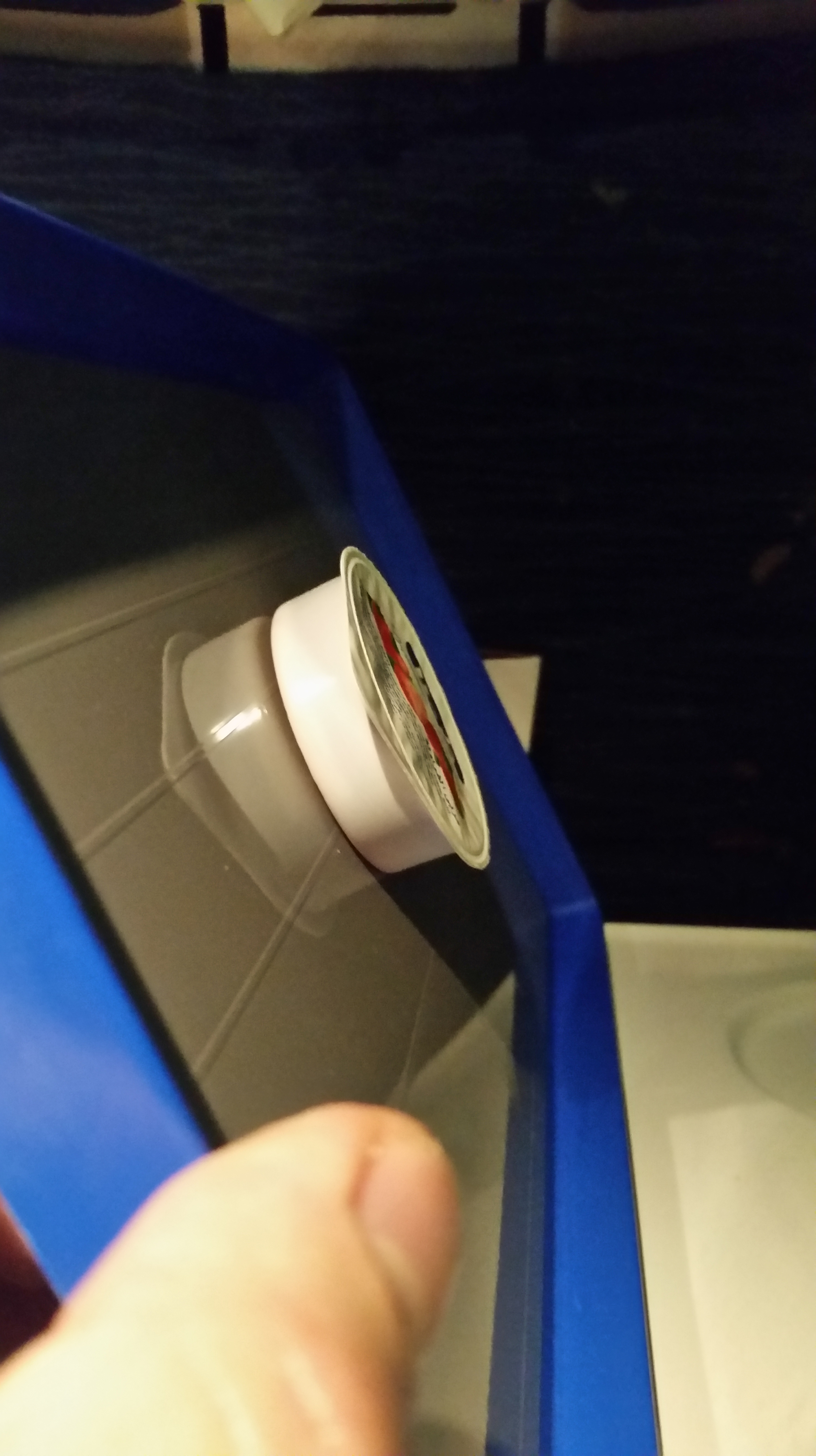
This would be the perfect coating for a smart phone pad in a car. I never managed to find out who made it.
Microsoft Spyware Now Being Installed On Win 7
If you’re the sort of person who isn’t entirely happy about the idea of Microsoft claiming the right to copy your personal files, photos, emails, chat logs, diary entries, medical records, etc over to their own servers to sell to whoever they want for whatever they can get for your personal data – into markets that already exist for insurance companies to deny you insurance based on algorithmic analysis of your habits or your friends habits or for financial institutions to set your interest rates based on similar criterion, or perhaps even for law enforcement to investigate you without a warrant, then OBVIOUSLY you would never, ever install Windows 10 under any circumstances.
Well, Microsoft seems to have fully jumped on the Google/Facebook gravy train and is now completely invested in stealing your data and selling it to the highest bidder (Apple has been exfiltrating your data for a long time, but so far for internal use). I’ve become more suspect of Microsoft’s updates since they made the Windows 10 advertisement an important (not optional) update (important for what? their bottom line, obviously). Turns out that the latest updates to Windows 7 are pushing Microsoft’s new business model of stealing your data for profit to Windows 7 and 8.
Staying safe is going to require ever more vigilance. It may be possible to block windows components from reaching out to microsoft’s servers at the personal firewall level and certainly it can be done at the corporate firewall level (and should be), but blocking Microsoft is a somewhat complex issue. You can’t run Windows safely without installing security patches because the underlying OS is so completely insecure that new, critical, exploitable flaws are discovered every single week. If you don’t constantly patch these security failures, you will be hacked by people other than microsoft. If you install the wrong microsoft patch, you will be hacked by microsoft. Debian anyone? Also, software developers developing enterprise software, please, please, please stop developing for that horrible, insecure, performance hobbling abomination of a tarted-up single-user OS “Server” and focus on a secure, stable server OS like FreeBSD. Please. I hate, hate having to fork over $1k to microsoft for each box to run their horrible OS just so I can run your software. Why do you support that extortion? Do you despise your customers that much? Stop.
If you care about corporate governance and data security or HIPAA compliance, you are probably violating some critical requirements by installing windows 10 or these new updates to your existing Win7/8 base if you do not block data exfiltration to Microsoft’s servers. This is spyware. These updates are stealing your data and sending it to Microsoft. If your business is subject to data privacy laws, these updates put you in violation of those laws. Microsoft is doing something that is extremely significant and extremely evil and completely wrong. Take action or you may very well be facing personal or corporate consequences. srsly.
I am a strong believer in data privacy and extremely suspect of what I consider highly disingenuous business practices like Google’s but I recognize that there are reasonable people out there who think Google isn’t evil. However, this windows 10 issue, now being pushed to windows 7, goes well beyond Google taking advantage of people’s historical assumptions about the security of email to offer them a free look-alike honey trap to gather their data. Windows 10 and these Win 7 updates are intrusive, not merely misleading. Do not update. Srsly. Do not update. Block the spyware “hotfixes.”
- Russia considers banning windows 10
- Bit torrent trackers ban Windows 10 users
- Windows 10 steals so much data it breaks your data plan and costs you money
- Windows 10 is spyware, plain and simple, including a keylogger.
Stop Gap Fixes
In researching these updates, I came across this article on techworm that has a nice summary of the Malware updates Microsoft is pushing out (with some additional amendments I found):
- KB2952664 (this one reappears no matter how often you unselect it or hide it – so memorize it as evil)
- KB2976978
- KB2977759
- KB2990214
- KB3021917
- KB3022345
- KB3035583
- KB3044374
- KB3068708
- KB3075249
- KB3080149
- KB3112343
- KB3123662
- KB3123862 (new)
- KB3173040 NEW – “final” full screen nag advertisement for Win10 malware
With a whiff of irony, this google search “telemetry site:https://support.microsoft.com/en-us/kb” shows these patches and many more…
Do not automatically install Microsoft updates. You must turn that feature off or you will keep getting additional spyware installed. Go to windows update and verify your settings. I have mine set so windows downloads the updates (so the updates are waiting locally), but I don’t let windows install them automatically. That gives me a chance to review the updates and look for spyware.
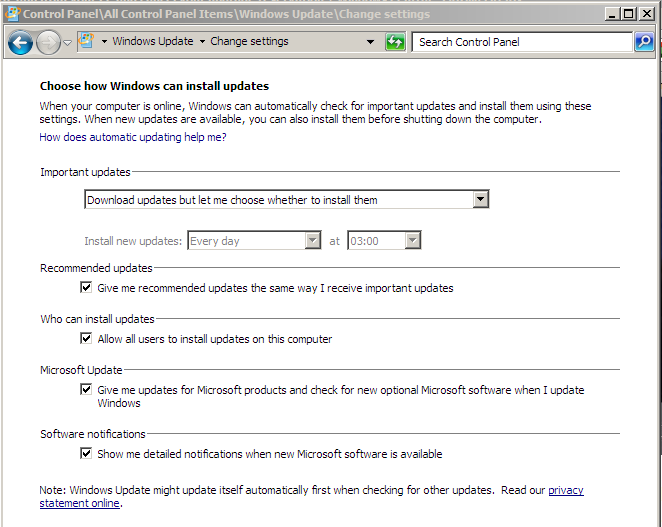
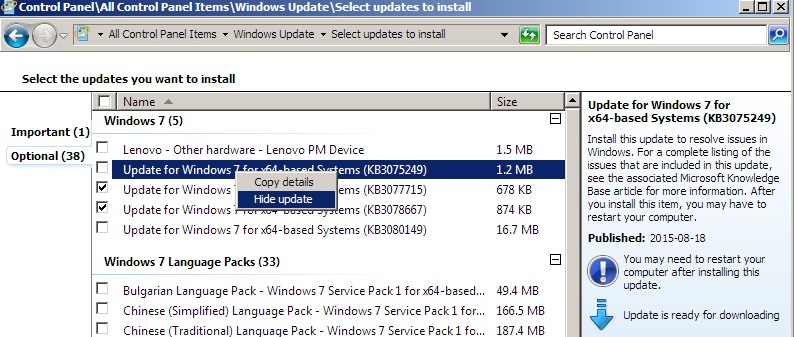
When you get updates, you now have to check each one of them to find out if it is spyware or not. The list above is current as far as I know, but clicking on the “more information” link to the right of the updates list will get you microsoft’s marketing speak obfuscation of the true purpose. Any update that “adds telemetry points” or something like that is spyware. Uncheck the install and hide the update. Note that some of these were moved from “optional” to “important.” Microsoft is absolutely intent on stealing your data and is taking some pretty underhanded steps to make it difficult for you to avoid it.
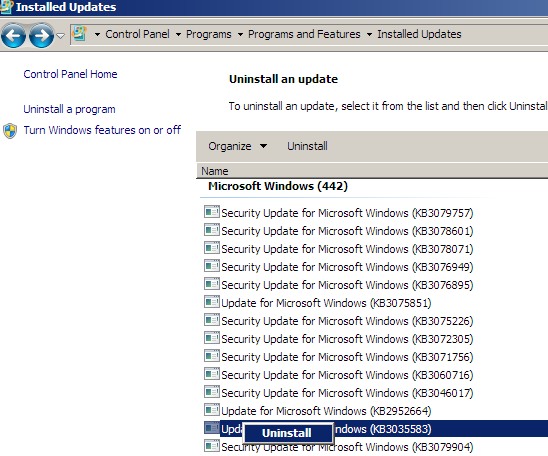
If updates get past you or it turns out later that a seemingly important or innocuous update was spyware (the fun part is that you now have to be vigilant and look all this stuff up), then you can uninstall them from the “installed updates” control panel.
Work to be done
I’ll start looking into firewall settings to block communication to microsoft’s servers. This is a standard anti-malware technique and should work here, except that microsoft has so many servers it is more challenging to block them than your typical malware botnet.
We need something like a variant of Peer Guardian to block microsoft’s servers using the standard P2P crowd-sourcing model to keep the list up to date. I’m not aware of anything like this yet, but I’m looking. Microsoft has become more of an enemy to privacy than the RIAA ever was.
UPDATE: this superuser answer includes a list of telemetry endpoints to block at your firewall or router. Alternatively you can edit your hosts file and add these entries from DSL reports.
Larger Significance
This shift in business focus by Microsoft from providing a product people are willing to pay for to stealing data from people to sell on the commercial market has some significant lessons for the entire software model.
It isn’t just that Microsoft is now adopting Google’s business model of giving away “free” goodies as traps to collect product (you) to sell to the highest bidder, but that the model of corporate trust that underpins most of the security assumptions the internet is built on is manifestly false and unsustainable. If any hacker tried to create these spyware updates, locked-down computers that only install signed code would refuse to install them. Ignoring for the moment that the signed code model is idiotically flawed as signing keys are stolen all the time, this microsoft spyware is properly signed with legitimate keys. It will be installed on locked down computers without complaint and will not show up in commercial anti-virus software. But it is spyware. It contains keyloggers and extremely productive data exfiltration code that is currently copying wholesale data dumps from unfortunate victims to Microsoft’s servers in such volume that their data caps are being hit.
If a non-commercial third party (e.g. “hacker”) did this, they’d be prosecuted. It makes no difference to you that your data is being stolen by Microsoft rather than by some clever teenager in a former eastern block country: your data is being stolen. But the model that has been promoted, a model of centralized corporate trust to validate the “security” of your system has been utterly and irrevocably shattered. This isn’t an accident, isn’t something that better data management might have prevented, this is an intentional ex post facto rewrite of the usual, customary, and regular assumptions we have about the privacy of our computer systems and one that significantly impacts the security of almost everyone in the world: military, medical, legal, fiduciary, as well as personal.
And even if you trust Microsoft (for whatever bizarre, irrational reason), Microsoft is creating a whole series of security holes in their already crappy and insecure operating system that will be exploited by third parties. By adding keyloggers and data exfiltration tools to the core OS, they’re making it even easier for non-corporate hackers to jump on the data theft gravy train. Everyone profits but you. You lose.
Disk Checks for Large Arrays
If you have a large array of disks attached to your server, which is obviously going to be running FreeBSD or OpenBSD if you care about security, stability, and scalability; there are some tricks for dealing with large numbers of disks (like having 227 4TB disks attached to a single host).
Using Bash (yes there are security issues, but it is powerful)
# for i in `seq 0 227`; do smartctl -t short /dev/da$i; sleep 15; done 1Thanks Jared
executes a short smart test on all disks. Smartctl seems to max out at 32 concurrent tests, so sleep 15 ensures the 3 minute tests are finishing before new ones are executed. If you’re in a hurry, sleep 5 should do the trick and ensure all of them execute.
to get results try something like:
# for i in `seq 0 227`; do echo "/dev/da$i"; smartctl -a /dev/da$i; sleep .5; done
Bulk Fixes
Problem with the disks – need to clear existing formatting?
unmount each disk
# for i in `seq 0 227`; do umount -f /dev/da$i; done
unlock (if needed)
# sysctl kern.geom.debugflags=0x10
Overwrite the start of each disk
# for i in `seq 0 227`; do dd if=/dev/zero of=/dev/da$i bs=1k count=100; done
Overwrite the end of each disk
# for i in `seq 0 227`; do dd if=/dev/zero of=/dev/da$i bs=1m oseek=`diskinfo da$i | awk '{print int($3 / (1024*1024)) - 4;}'`; done
Recreate GPT (for ZFS)
# for i in `seq 0 227`; do gpart create -s gpt /dev/da$i; sleep .5; done
Destroy multipaths
# for i in `seq 1 114`; do gmultipath destroy disk$i; done
Disable multipath completely
# for i in `seq 1 114`; do gmultipath destroy disk$i; done
# gmultipath unload
# mv /boot/kernel-debug/geom_multipath.ko /boot/kernel-debug/geom_multipath.ko.bad
# mv /boot/kernel/geom_multipath.ko /boot/kernel/geom_multipath.ko.bad
Footnotes
| ↑1 | Thanks Jared |
|---|